AI diet planner for dietitians: the AI drafts, you approve.
mealPlan.fit gives dietitians and nutritionists an AI assistant that drafts meals, imports diet charts, writes recipes and reads lab reports. You review and apply every change, and nothing reaches your client until you share it.
By the mealPlan.fit team · Last updated 16 October 2026
What the AI does for you
Meal ideas, swaps and edits
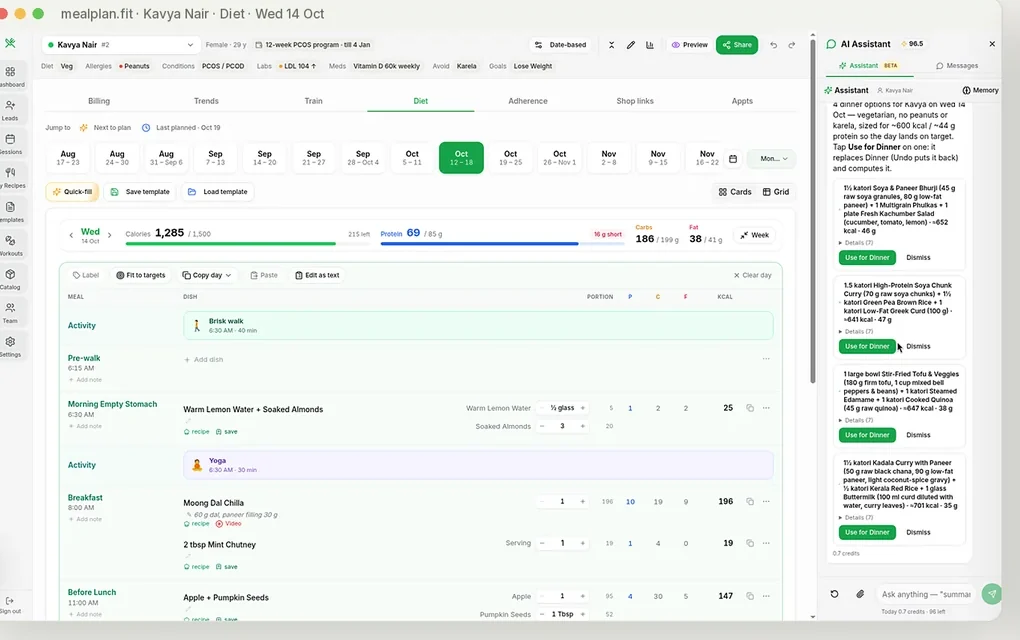
Options for one meal, a swap on one day, or a full day built to the client’s calorie and protein target, using your own dishes first.
Import a diet chart
Attach an old chart as a PDF or photo and get every meal, option and note on one card, ready to check and apply.
Recipes from a dish name
Type a dish and get a recipe with ingredients and steps. Compute macros from the ingredients, and save it to your recipes for next time.
Fit to the client’s target
Adjust a day’s portions toward the calorie and protein target in one step, then fine-tune by hand.
Lab report scanner
Upload a lab report PDF or photo; values like HbA1c, TSH and vitamin D are read into the client’s Trends for you to confirm.
Consultation notes
Record or type a consultation and get a short summary in the client’s record; it can also recap previous visits before a follow-up.
How it works
1. Ask in plain words
Type what you want for the client on screen, in English or Hinglish. The assistant already knows their targets, diet type, allergies, dislikes and your own dishes.
2. Review the card
It answers with a card showing exactly what would change: dishes, portions, and each day’s calories and protein against the target.
3. Apply, then share
Tap Apply to put it in the plan, or ask for changes. Nothing reaches your client until you share the plan yourself.
Try asking
- “Give me 4 lighter dinner options for Kavya, no peanuts”
- “Swap Tuesday’s dinner for moong dal khichdi”
- “Make her Friday 1,600 kcal with 80 g protein”
- “5 high-protein vegetarian breakfasts for a PCOS client”
- “Import this diet chart for Rahul (attach a PDF or photo)”
- “Add a 30-minute walk after dinner on weekdays”
See a day planned
A short walkthrough of planning a client’s day, with portions and macros adding up as you go.
What it costs
AI credits are included: 500 a month on Pro (₹1,999/month) and 1,000 on Max (₹2,999/month), incl. GST, with a 7-day free trial.
| How-to question about the app | about 0.1 to 0.5 credit |
| Meal ideas, swaps and edits in chat | a few credits, shown on each reply |
| Recipe from a dish name | 1 credit |
| Plan translation | 1 credit |
| Lab report scan | 5 credits |
You stay in charge
Every suggestion is a card you can apply, change or dismiss. After applying you can keep editing by hand, and your clients only ever see the plan you shared.
Indian food, calculated
Nutrient values are calculated from IFCT ingredient data when you build or compute a dish from its ingredients, with 22 micronutrients tracked against ICMR 2020 RDAs. Browse 860+ Indian foods in the nutrition database.
Questions
Does the AI make the diet plan for me?
No, it drafts and you decide. The assistant proposes meals, swaps or a whole day on a card, and nothing changes in the plan or reaches your client until you review it and tap Apply.
Where do the nutrition numbers come from?
Dishes you build or compute from ingredients get values calculated from Indian Food Composition Tables (IFCT) data, with 22 micronutrients checked against ICMR 2020 RDAs. Quick AI dishes in Simple mode show AI-estimated calories and macros until you compute them from ingredients.
How much does the AI cost?
AI credits are included in the plan: 500 a month on Pro (₹1,999/month incl. GST) and 1,000 a month on Max (₹2,999/month incl. GST). A recipe costs 1 credit, a lab report scan 5, a plan translation 1, and a how-to question to the assistant about 0.1 to 0.5.
Can it turn an old diet chart into a plan?
Yes. Attach the chart as a PDF or photo in the assistant, and it reads every meal, option and note into one card that you check before applying it to the client.
Can plans go out in my client’s language?
Yes. Set the client’s preferred language (Hindi, Marathi, Tamil, Telugu, Bengali, Gujarati, Kannada, Malayalam, Punjabi, Urdu, Arabic and more) and the plan PDF can be printed or emailed with a translation for 1 credit.
Related
See it with your own clients
A short demo on WhatsApp, then we set up your account with you.